


.png)
.png) hey guyz....im so happy , having a gr8 time coz my ad-sense has been approved by google people !
hey guyz....im so happy , having a gr8 time coz my ad-sense has been approved by google people !#thanx to google ppl and #cheers to ad-sense team :)
#plus i got 2000 credit 4 ad-words !
so thanx to google people alot !
so here the post dedicated to web-ster's out der !
so here come's offline apps first !
1.Gmail Offline

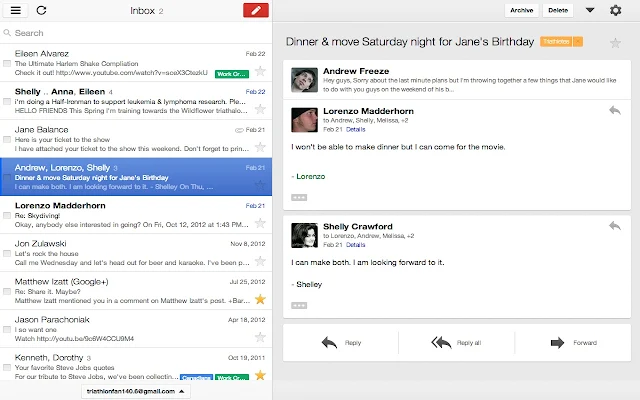
Description
Gmail Offline beta is a Gmail app built to support offline access, allowing mail to be read, responded to, searched and archived without network access. After first start-up, Gmail Offline will automatically synchronize messages and queued actions anytime Chrome is running and an Internet connection is available. More than just an offline app, the streamlined user interface, based off Gmail’s popular tablet interface, provides extremely fast response time with a pure, email focused experience.
To start Offline Gmail after installing, open a new tab in Chrome; In the new tab pane you will see a Gmail Offline Icon. Click on the icon, and Offline Gmail will load.
Get here ur App !
2.Pocket

Description
The best way to save-for-later articles, videos and more, even works offline!
When you find something on the web that you want to view later, put it in Pocket. It automatically syncs to your phone, tablet or computer so you can view it at any time, even without an internet connection.
New York Times, Business Week, and TechCrunch call it "DVR for the web."
WHAT YOU CAN POCKET: Articles, videos, or pretty much anything you find online.
VIEW EVERYWHERE: If it’s in Pocket, it’s on your phone, tablet, and computer.
EASY ON THE EYES: See your articles, videos, and everything else in a beautiful, easy-to-view layout.
PLAYS WELL WITH OTHERS: Save directly from over 400 different apps like Twitter, Flipboard, Pulse, and Zite
Get ur App here !
3. My Chrome Theme

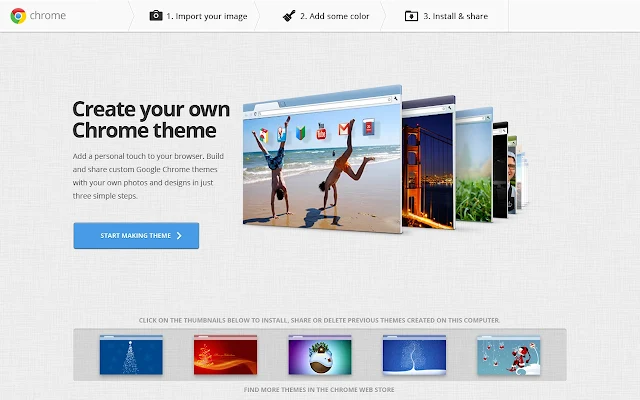
Description
Create and share Google Chrome themes of your own design.
Add a personal touch to your browser. Create and share custom Chrome themes using your own images and designs.
In three simple steps:
1) Import an image from your computer to use as your theme background. Adjust the size of your image, placement, and more.
2) Add some color to the rest of your theme by customizing the omnibox, tabs, and remaining parts of the browser.
3) Name your completed theme and install it on your own Chrome, or share it with others on Google+ or through a unique URL.
Make a custom Chrome theme for yourself, a friend, or even Grandma (hint: use a family photo that she might enjoy seeing on her computer). Let your creative juices flow!
Updated in Version 2:
-Added offline theme creation functionality
-Added image filters to Step 1.
-Added additional color options to Step 2.
-Added the ability to save your themes as .zip files
Get ur App here !
4.Photo Editor

4.Photo Editor
Description
is a free online photo editor. Edit, adjust and filter your images. No registration jump right in!
Full featured in browser photo editor!
Photo Editor presents a full featured photo editor direct in your browser, no download, no wait and 100% free.
If you are used to working with Gimp, Paint shop pro or even Photoshop you will feel right at home with this online image editor. It contains lots of the features that you normally see in desktop applications but just one click away. Jump in and start using this tool, no registration required and loads in matter of seconds.
Photo Editor editor is the most popular advanced photo editor online!
Some of the tools included are, red eye reduction, spot heal tool, drawing tools, clone tools, sharpen and blur tools and many more.
Some of the filters include, mimic HDR, glamor glow, tilt-shift, Gaussian blur, vignette, noise and lots of more.
5.Until AM for Chrome

often music gives us relief from our stress n head ache :)
so here iz da best offline mixer .....to have gr8 fun !
so here iz da best offline mixer .....to have gr8 fun !
Description
Virtual turntables in a neat package
Until AM for Chrome offers a full-fledged DJ setup in a lightweight packaged app. Possibilities include vinyl scratching with two turntables, playback speed adjustment, sound modification through effects and more. Use the music from the cloud while online or keep the party going with your locally stored songs even when you're playing at a venue with an unstable internet connection.
THOUSANDS OF SONGS IN YOUR RECORD CASE
Seamlessly combine the enormous amount of songs uploaded by the SoundCloud community with your own audio files.
* Access songs from SoundCloud
* Download songs onto your hard drive as mp3 files
* Search for your favourite artists or find out what's hot in the community
* Load your own audio files from the local hard drive
* Access your audio files on any computer through integrated Google Drive browsing
* Collaborative deejaying: share songs among friends easily with Google Drive
* Support for .mp3, .wav and .ogg file formats
* Search and preload songs while playing other ones
* Simple interface: one list of songs, drag and drop onto the turntables
VERSATILE SOUND TWEAKING
Throw some live performance flavour into your set with virtual vinyl scratching and effects. Add a slight stadium echo, or deform the songs completely - you're the dj at controls!
* Web's most realistic turntable simulation
* Accurate effect control with an xy controller pad
* Echo, chorus, filter, bitrate and distortion effects
* Combine multiple effects for advanced crookedness
SUPERIOR USER EXPERIENCE
* Keyboard shortcuts for the seasoned users
* Favorite songs and Play history are remembered between sessions and between same user's different computers
* Automatically connected to your Google Drive
* Full screen mode allows for undisturbed concentration
* Uncompromised visual quality also on high pixel density displays (e.g. Macbook Pro with Retina Display or Chromebook Pixel)
More info at http://until.am
6.Webcam Toy 

Description
Take photos with your webcam using over 80 free fun effects. Save photos to your computer or post to Twitter, Tumblr and Facebook!
Play with more than 80 fun camera effects and filters, take photos, save to your computer, and post them straight to Twitter, Tumblr or Facebook!
OFFLINE: To use Webcam Toy offline, open the app once whilst connected to the Internet and allow it to download completely. Only then can you disconnect and use it offline.
Webcam Toy will load in a few seconds. Allow access to your web camera when prompted, then select an effect from the menu in the lower half of the screen by pressing the left or right arrows. Take a picture by pressing the camera button, and choose to save or share.
Also use these keyboard shortcut keys in the app:
← → Arrow keys - Go to previous/next effect.
'G' - Show the Grid view, where you can see 9 effects at once.
'I' - Show the Info (settings) menu.
'S' - Square the photo (good for avatar/profile pictures).
'F' - Turn the camera flash on or off.
'C' - Turn the photo Countdown on or off.
'M' - Mirror the photo (good for when showing words to the camera).
That's it! Have fun taking photos online with Webcam Toy!
7.Gliffy Diagrams


Description
Diagrams Made Easy. Draw a flowchart, org chart, UML, ERD, network diagram, wireframe, BPMN, and other diagrams.
Gliffy Diagrams is a whole new kind of Chrome App that EVEN WORKS OFFLINE!
Now anyone can create professional-looking diagrams and flowcharts quickly and easily. Include them in Google Docs, presentations, wikis or web pages.
FEATURES:
- Easy to use interface built with HTML5
- Hundreds of industry-standard shapes, arrows and icons
- Snap-to-grid, drawing guides, shape alignment and distribution tools
- Drag & drop your images onto the canvas
- Export diagrams to PNG (more file formats to come)
- Shape libraries for software development. UML diagrams, ERD diagrams, sitemaps, wireframes, UI mockups, SWOT analysis and more!
GREAT FOR:
- Basic drawing
- Flow chart
- UML diagram
- ERD diagram
- Network diagram
- Wire frames & UI Mockup
- Site map
- Business Process Model
- Org chart
- Floor plan
- Venn diagram
- SWOT analyses
- Technical drawing
REVIEWS:
PC Magazine says: "For personal use, small business and particularly for network admins who need quick and easy diagram-making, Gliffy is very good. It’s a four-star earner for small business software..."
ZDNet says: "Gliffy is a popular and less costly alternative to Microsoft Visio. It is mostly used in planning and documenting software development, business processes and organization charts, with an emphasis on functional business graphics such as diagrams, flowcharts and wireframes."
JUST CLICK THE 'ADD TO CHROME' BUTTON ABOVE TO GET STARTED WITH GLIFFY
Need help? Have feedback? We want to hear from you. We've got lots more planned for this app. Email us at support@gliffy.com for everything from installation to troubleshooting.
Happy drawing!
part-2 coming soon !
#plz keep on vist'n !


